Top-Up Methods
Top-Up Overview
shallowseek supports two top-up methods: online payment and redemption codes. All top-up amounts are accumulated into the same account balance.
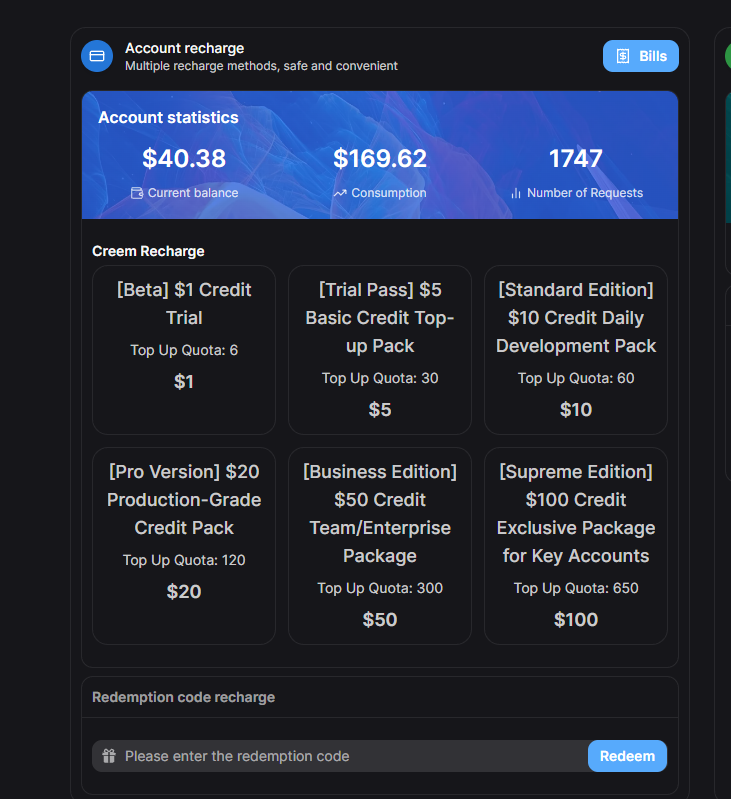
Wallet page — choose top-up and redemption methods
- Online Payment — Supports international credit cards and other payment methods to purchase credit packages
- Redemption Code — Use a redemption code issued by the administrator to directly add credits
Online Payment
You can purchase credits using international credit cards and other payment methods:
-
Go to Wallet Page
After logging in, find the "Wallet" or "Top-Up" entry in your account center or sidebar.
-
Select a Credit Package
Choose the credit package you wish to purchase.
-
Complete Payment
Follow the on-screen instructions to complete payment. Credits will be automatically added to your account.
Credits typically arrive within 1-2 minutes after payment. If delayed, please wait or contact the administrator.
Redemption Code Top-Up
If you have a redemption code issued by the administrator, you can directly redeem it for account credits:
-
Go to Wallet Page
Find the top-up or redemption entry in your account center.
-
Enter Redemption Code
Paste or type your redemption code into the redemption code input field.
-
Confirm Redemption
Click the redeem button. The system will verify the validity of the code and automatically add the corresponding credits to your account.
Redemption codes typically have usage count and expiration date limits. Please use them promptly. Each redemption code can only be used once.
View Balance & Records
You can view your account balance and usage records in the following locations:
- Console Homepage — Displays current available credits
- Usage Logs — View detailed consumption breakdown for each API call
- Top-Up Records — View the history of all top-up/redemption transactions
- Dashboard — View credit usage trends and statistical charts